
6
Lifecycle stages
5
Functional teams
Unit
Individual equipment identity
Zoho
Connected platform
The operating challenge
The responsibility continues after equipment is delivered.
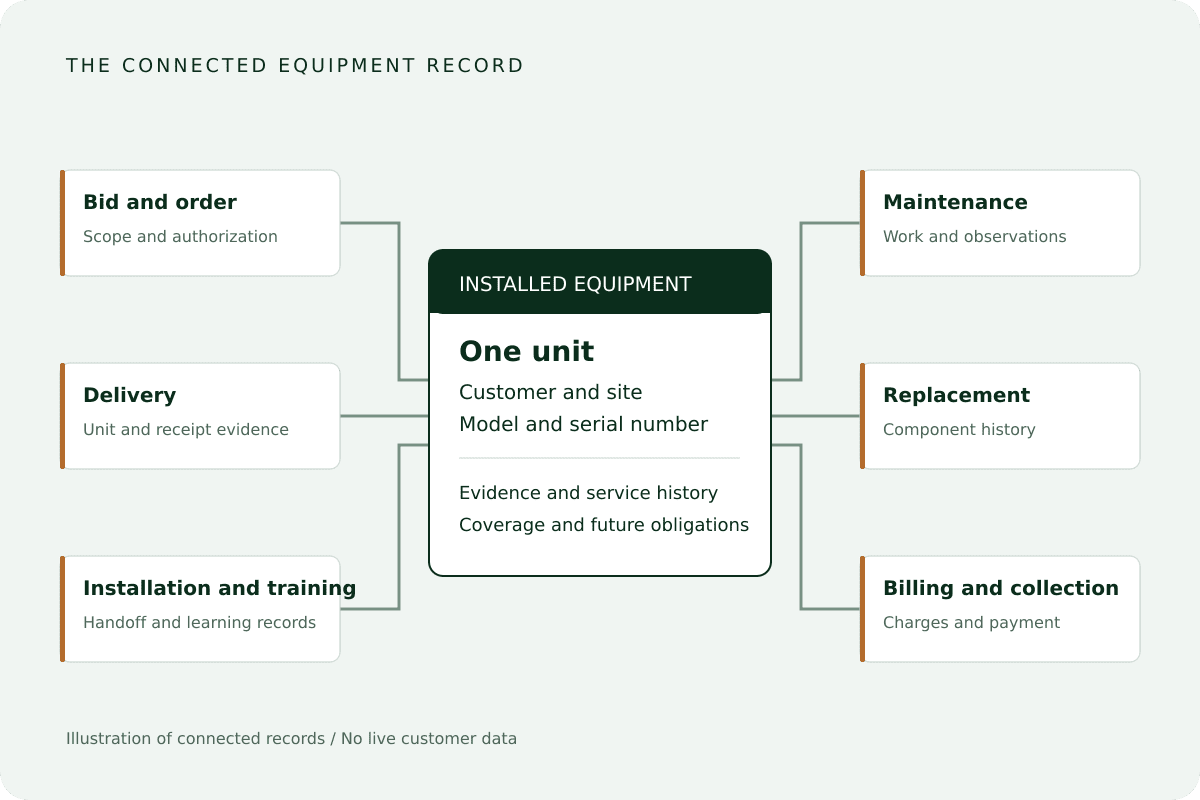
MEDwheels provides automated external defibrillators, accessories, and training. Supporting that equipment requires knowing which unit is at each site, what installation and service work was completed, which components changed, and what obligation comes next.
Connect the accepted quote and purchase order to the actual goods supplied.
Retain serial or lot identity through partial shipments and discrepancies.
Separate installation acceptance from training attendance and credential evidence.
Distinguish included service, warranty treatment, and chargeable work.
Operating-system design
Make the installed base a working service record.
Preserve equipment identity, location, manufacturer, model, and serial number.
Keep removed components and replacement components in the history.
Review delivery, installation, and service evidence independently.
Use contractual triggers and remaining quantities to determine billing eligibility.
Zoho CRM
Customers, opportunities, bids, and order context.
Zoho Inventory and Books
Procurement, stock, fulfillment, invoicing, and payment.
Zoho FSM and Desk
Equipment, work orders, appointments, and support cases.
Zoho Creator and WorkDrive
Programs, reviews, obligations, billing eligibility, and supporting documents.
Zoho Analytics
Operational exceptions, service obligations, and financial visibility.
Control Points
The lifecycle is controlled where operating risk changes.
Each point combines an authoritative record, accountable owner, prerequisites, evidence, decision state, and recovery behavior.
01
Bid and order
Accepted quotes, procurement requirements, and customer purchase orders establish scope. Review the customer, approved version, delivery requirements, and evidence before operational release.
02
Procure and deliver
Connect purchasing, receiving, serial or lot allocations, packaging, and delivery acknowledgments. Partial shipments and discrepancies remain linked to the order's outstanding commitment.
03
Install and train
Installation reviews capture the unit, site location, checklist, and acceptance. Training records distinguish registration, attendance, assessment, and verified credential evidence.
04
Maintain and replace
Agreements, maintenance obligations, and component histories guide work. Battery and pad replacements preserve old and new component details; faults, returns, warranty work, and recall actions remain traceable.
05
Review and bill
Check contractual triggers, evidence, approved scope, and remaining billable quantity. Included service, warranty treatment, and chargeable work stay distinct; finance reviews the draft invoice before release.
06
Collect and renew
Posted invoices, payment allocations, and balances support collection follow-up. Agreement and training renewal dates identify future work with the earlier service and commercial history available.
illustrative workflow
A component replacement keeps its equipment history.
Illustrative workflow based on a recorded component date requiring follow-up, not a live customer transaction.
01
Review the obligation
The coordinator reviews the unit, agreement, component date, and service history together.
02
Authorize and replace
Authorized work records removed and replacement components and links the stock transaction.
03
Review the service
Check the work report and outcome while retaining any unresolved equipment observation or corrective action.
04
Determine the charge basis
The agreement determines whether the work is included, covered by warranty, or chargeable before finance proceeds.
Evidence and responsibility
A completed visit does not erase an unresolved equipment issue.
Operational acceptance, billing eligibility, and financial status remain separate facts linked to the original work.
Distinct acceptance records
Delivery, installation, and service each retain their evidence and review.
Component continuity
Removed parts retain their history while new components receive their own details and dates.
Financial authority
Invoice and payment status come from finance records, linked to the relevant contract and work.
Owned recovery
Role permissions, approval separation, exception records, integration logs, and reconciliation support accountable review.
delivered scope
Distribution and service connected around the equipment unit.
The portfolio documents an implemented operating platform and its application responsibilities. It makes no quantified clinical, safety, or financial outcome claim.
Equipment lifecycle
Bids and orders through delivery, installation, training, maintenance, replacement, billing, and collection.
Connected installed base
Identity, location, deployment evidence, coverage, components, observations, and future obligations.
Defined platform roles
Zoho commercial, inventory, finance, field-service, support, control, document, and analytics applications.
Designed to improve
The operating improvements the system targets.
Order commitments
Sales and warehouse teams can identify received, delivered, and outstanding goods and the handoff needing attention.
Service obligations
Service and training teams can locate installed equipment, completed work, and due maintenance, replacement, or renewal activity.
Billing readiness
Finance can see supported milestones, charges awaiting review, and unpaid invoices.
questions
What buyers usually need to know.
Your next control point
Where does your operating system lose control?
Start with the handoff, decision, evidence, or recovery problem that creates the most friction today.